
This guide will explain how to manage changes to a Email Distribution list that you manage,
- Go to to the Microsoft Portal for Group management. Exchange admin center
- Login with you West login detail. Then click on Groups I own
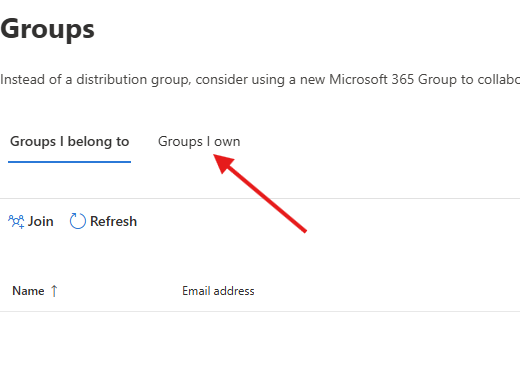
- You will now see a list of Distribution Lists you are the manager of. Click on the name of the group you wish to edit.
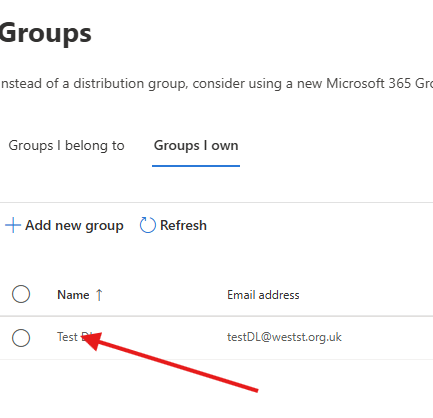
- You will now have the settings windows load up on the right hand side of the browser. Click on the members tab
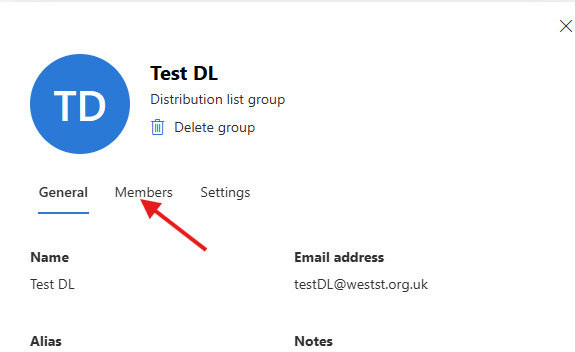
- With in the Members tab you can add/remove members in the group, you can also change the group Owner. If you add members to the owners part, the user will be able to also edit the group. If a user is added to the members part, the users will only receive emails and will not be able to edit the group.
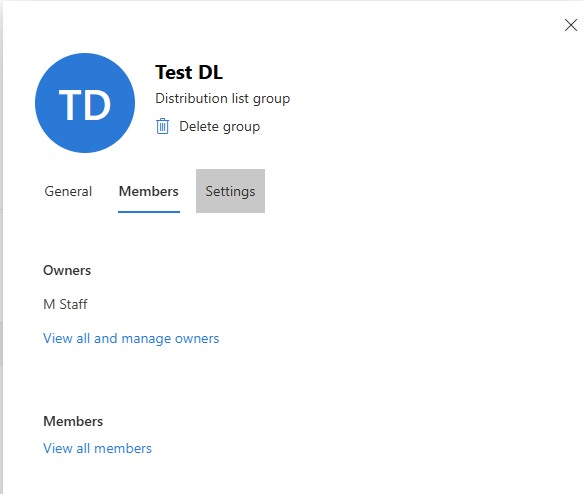
- Settings Tab, Please do not make any changes to this section without getting permission by a member of ICT Support first. This request must be done by logging a ticket with the team.
If you need any more help please log a request with the ICT Support team.